What Is Gherkin Style? A Simple Guide for Product Owners and Agile Teams
If you work with Agile teams, you have probably seen acceptance criteria written using the words Given, When and Then.
That structure comes from Gherkin, a plain-language way to describe how a feature should behave. It helps teams turn broad requirements into specific examples they can discuss and test.
Whether you are writing your first user story or improving how your team refines its backlog, this guide explains the format, when it helps and how to write a useful scenario.
What Is Gherkin?
Gherkin is a structured language for describing behaviour through examples. Each scenario sets out a starting situation, an action or event, and an expected result.
It is used in Behaviour-Driven Development (BDD), an approach where people discuss concrete examples to agree how software should behave. Gherkin records those examples; writing in the format alone does not mean a team is practising BDD.
Acceptance criteria describe the conditions a piece of work should satisfy. Gherkin scenarios can illustrate those conditions, although straightforward criteria can also be written as a clear checklist.
Used thoughtfully, Gherkin can help a team:
- Spot ambiguous requirements and hidden assumptions.
- Build a shared understanding of expected behaviour.
- Describe outcomes that can be checked.
- Bring product, design, development and testing perspectives into the same conversation.
Why Teams Use Gherkin
Consider an acceptance criterion such as “The customer can save products”. It sounds straightforward, but leaves several questions unanswered. Does the customer need an account? Where do saved products appear? What happens if a product has already been saved?
Working through an example encourages the team to make those decisions explicit. The three main keywords give that discussion a useful structure.
Given: The Starting Situation
Purpose: Describe what is already true before the action happens.
Include the conditions that affect the outcome, such as whether someone is signed in or whether their basket contains an item.
Example: Given I am a signed-in customer and the product is not in my wishlist.
When: The Action or Event
Purpose: Identify what triggers the behaviour.
This might be a user action, such as submitting a form, or an event from another system. Focus on the meaningful action rather than every click needed to reach it.
Example: When I save the product to my wishlist.
Then: The Expected Outcome
Purpose: State a result someone can observe and check.
Avoid vague outcomes such as “it works correctly”. Describe what the user or another system should see.
Example: Then the product appears on my wishlist page.
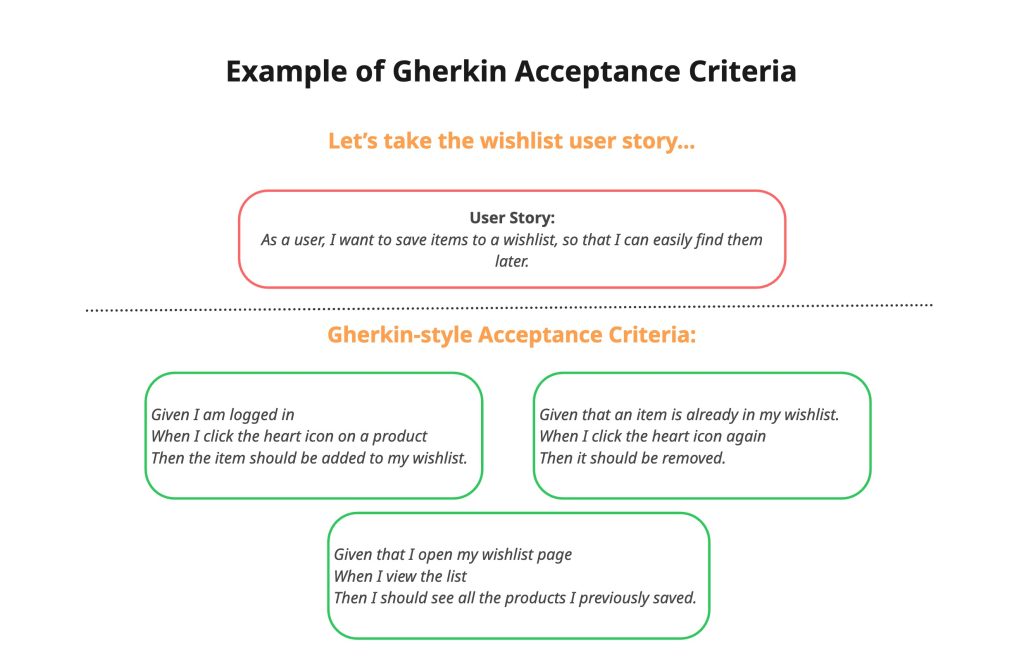
A Practical Gherkin Example
Here is an illustrative wishlist feature with two scenarios. The first covers adding a product. The second describes what should happen when that product is already saved.
Feature: Save products for later

  Scenario: Save a product to a wishlist
    Given I am a signed-in customer
    And the product is not in my wishlist
    When I save the product to my wishlist
    Then the product appears on my wishlist page

  Scenario: Save a product that is already saved
    Given I am a signed-in customer
    And the product is already in my wishlist
    When I try to save the same product again
    Then my wishlist contains only one entry for that product
Feature groups related scenarios. Scenario names a specific example. And adds another condition or outcome without repeating the previous keyword.
The second scenario makes a product decision visible: saving an existing item should not create a duplicate. Your team might choose different behaviour, but it should be discussed and recorded.
When Should You Use Gherkin?
Gherkin is particularly useful when the outcome changes depending on the starting conditions, or when people interpret a requirement differently.
Consider using it for:
- Permissions: an administrator can perform an action that a standard user cannot.
- Validation: a form responds differently to complete, missing or invalid information.
- Business rules: eligibility for a discount depends on agreed conditions.
- Alternative paths: a payment succeeds, fails or is cancelled.
- Automated checks: the team wants agreed scenarios to support repeatable testing.
You do not need Gherkin for every small change. A simple text correction may be clearer as a short acceptance criterion. Choose the format that helps people understand the work.

How to Keep Your Scenarios Useful
- Use specific outcomes. Replace “the correct error appears” with the agreed message or behaviour.
- Focus each scenario. Separate different rules or outcomes rather than describing an entire customer journey at once.
- Explore more than success. Discuss invalid information, unavailable services and missing permissions where relevant.
- Keep the language accessible. People should be able to review the behaviour without understanding the implementation.
- Review the examples together. Ask someone else to explain the expected result. Different interpretations reveal where more discussion is needed.
Final Thoughts
Gherkin gives teams a useful structure for describing behaviour. Its value comes from the decisions and conversations behind the words, rather than the keywords alone.
It cannot guarantee that a team builds the right thing first time. It can help people spot misunderstandings earlier and agree outcomes they can check.
Try this with your next user story: choose one acceptance criterion and write a Given, When, Then example.
Ask a teammate whether the starting conditions and result are clear. Then change one condition, such as the user’s permissions, and discuss whether the outcome should change too.
Technical reference: Cucumber’s official Gherkin reference. The wishlist scenarios are illustrative examples.


You May Also Like

Your Ultimate Guide to a Successful Product Launch: Step-by-Step with Real-World Example

Product metrics: how to measure progress that matters to users