How to Use ChatGPT Projects: Practical Ideas for Learning, Work and Content Creation
If you regularly use ChatGPT, you might recognise this routine: start a new chat, explain what you’re working on, describe your audience, repeat your preferences and upload the same background information.
Then do it all again next week.
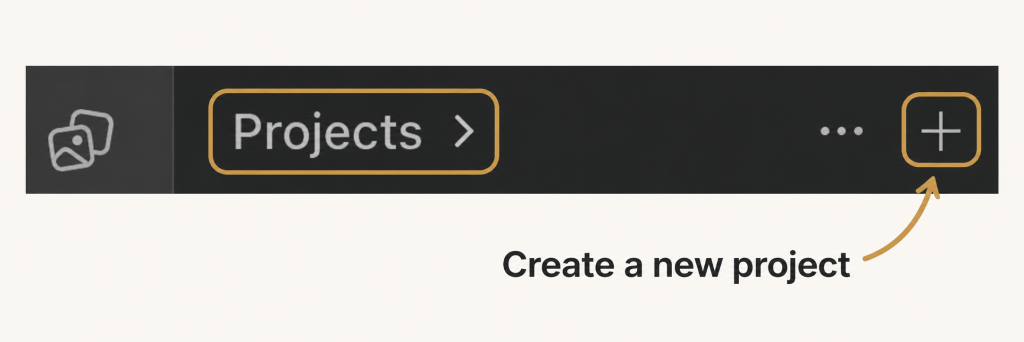
ChatGPT Projects give related work a home. They bring together chats, reference files and instructions around a particular topic or goal. Those project instructions apply across the chats within it.
If you are learning to code, moving into product roles or building something of your own, that creates some useful possibilities.
The value comes from giving ChatGPT relevant context and a clear job to do. Here’s how to get started, and where I recommend using Projects most.
What is a ChatGPT Project?
A Project is a space for an ongoing piece of work.
You might create one for learning JavaScript, preparing for product management interviews or developing your blog. Within it, you can keep separate conversations for different tasks while making shared files and instructions available to those chats.
For a blog, that could mean keeping your audience description and writing guidance together, then having individual chats for article ideas, outlines and editing.
My rule of thumb: create a Project when you expect to return to the same goal and background information repeatedly.
For a quick, unrelated question, an ordinary chat is usually enough.
How to set up a useful Project
1. Choose a specific purpose
Start with something you’re already working towards.
“Learn JavaScript” gives you a clearer focus than “Tech stuff”. “Prepare for my first product owner role” is more useful than “Career”.
Write down the outcome you want. For example:
I want to build a small portfolio website and understand the HTML, CSS and JavaScript I use.
That purpose will help you decide what belongs in the Project.
2. Add a small set of relevant sources
Choose material that helps ChatGPT understand your task. Depending on the Project, this might include:
- Your own study notes and course outline.
- A CV and a few relevant job descriptions.
- A website brief and examples of your writing.
- A product brief and anonymised research notes.
Add reusable material as project sources. Attach something to an individual chat when it only matters for that task.
I recommend starting with a few useful documents. A large collection of outdated or unrelated files makes it harder to establish which information matters.
3. Write clear project instructions
Project instructions describe how you want ChatGPT to help across that body of work.
Include your goal, current knowledge, preferred style and any boundaries that matter.
For a coding learning Project, you could use:
For a content Project:
4. Keep each chat focused
I recommend using one chat for each distinct task or output.
Within a career Project, you might have chats called:
- CV review.
- Product owner interview practice.
- Examples of stakeholder management.
- Questions to ask an interviewer.
Give each conversation a clear title so you can find it later.
5. Give every task a clear prompt
Project instructions provide background. Your prompt still needs to explain what you want now.
Compare:
Help me with interviews.
With:
Just leaving this to save herr:
The second prompt defines both the task and the way you want to work through it.
What are ChatGPT Projects best used for?
These are the uses I would prioritise for the Coded Female audience.
Learning a technical skill
A learning Project can give your practice some structure.
For JavaScript, you could organise conversations around functions, arrays, debugging and small features you want to build. Add notes about what you’ve covered and where you’re getting stuck.
The important part is doing the thinking yourself. Ask for explanations, practise without the answer in front of you and test your code.
Preparing for a career move
A career Project is useful when several tasks depend on the same background: your experience, skills and target roles.
You could use it to identify gaps in your CV, practise interview answers or compare the responsibilities in different job descriptions.
For people moving from development into product or delivery, this can also help make transferable skills more visible. Explaining a technical decision, resolving a disagreement or helping a team clarify requirements may all provide relevant examples.
You still need to decide whether the wording accurately represents your contribution.
Developing a blog or website
Content work often depends on consistent background information: who you’re writing for, what you cover and how you want to sound.
For Coded Female, useful project guidance would include the audience, subject areas, writing preferences and accurate professional background. Individual chats could then focus on a guide to Scrum, a product metrics article or homepage copy.
Review the result for accuracy, usefulness and voice. Add your own judgement and experience wherever they make the piece stronger.
Supporting product and delivery work
A Project can provide a place to work through related briefs, questions and draft communications.
You might use it to challenge a feature proposal, identify missing acceptance criteria or prepare a stakeholder update. Acceptance criteria are the conditions a piece of work needs to meet before it is considered complete.
From my experience across development, Scrum and product ownership, the questions around a piece of work often matter as much as the document itself.
Use AI to prepare for those conversations. Decisions about priorities, commitments and people still need human judgement.
Studying towards a qualification
For a longer course or qualification, I recommend organising a Project around the syllabus, your notes and the topics you need to revisit.
Check explanations against the official learning material. A convincing answer can still be wrong, and generated questions should not be treated as official exam questions.
How to get better results over time
A useful Project needs a little maintenance.
Keep your instructions current as your goals change. Label draft and approved documents clearly. Remove outdated sources where appropriate, and tell ChatGPT which version to use when several exist.
For work you plan to revisit, write a short status note containing:
- What you have decided.
- What remains uncertain.
- What you want to do next.
Review outputs before using them, especially factual claims, code, calculations and descriptions of your experience. For workplace material, follow your organisation’s AI policy and only use information you are authorised to share.
Start with one Project
You don’t need to organise your whole life at once.
Choose one goal you expect to work on over the next few weeks. Add a small amount of useful background, write clear instructions and give ChatGPT one specific task.
That might be practising JavaScript, preparing for an interview or drafting your next article.
After a few sessions, review what helped. Were the explanations at the right level? Did you keep correcting the same wording? Was an important piece of context missing?
Use those answers to improve the setup.
A useful ChatGPT Project should make it easier to return to your work with a clear next step. Start with something that matters to you, and build from there.


You May Also Like

Scrum Fundamentals: Breaking It Down with Everyday Examples
Better requirements: working with developers, standards and suppliers